

 Can't travel? Don't want to travel? Check out the new live virtual schedule and e-Learning courses!
 Training and Consulting in CyberSecurity Testing - Self-paced e-Learning for ISTQB Advanced Security Tester.
  We have over 30 e-learning courses available on demand!
  ISTQB Accredited Training - Foundation Level, Advanced Levels and ASTQB Mobile Tester Certifications.
  E-Learning available anytime!
 Need Expert Guidance in Software Testing and QA? That's What We Do!
 Training and Consulting in Testing Mobile Applications - ASTQB Certified Mobile Tester Training
 Confused by Requirements? We Have Answers! IQBBA Training
 Special Pricing for Federal, State and Local Governments
Rice Consulting Services specializes in software testing training, software testing consulting, and independent testing. We equip you to test your systems better and faster so you can focus on your business instead of technology problems.
With over 30 years experience in building and testing IT systems, we can bring the expertise you need to be successful in meeting your business goals and increasing profits.
 I hope you can take advantage of a unique opportunity to attend live virtual training for the ISTQB Advanced Security Tester certification in September.
The dates of the course are from 9 a.m. to 5:00 p.m. EDT on Dec. 10 - 13, 2018, and January 14 - 17, 2019.
I will be the instructor of the course. As chair of the ISTQB Advanced Security Tester Working Group, I can bring a unique perspective to the training and prepare you to take the exam.
Here's what you need to know:
1. This is a live virtual class that you can take from your desk or home. You will be able to interact with me, ask questions, make comments, etc.
2. This will be an intensive course with over 20 exercises. I will present some material, then we will have exercise time. At the completion of each exercise, I give my perspective about the solutions.
3. We will go over every question in the ASTQB Sample Exam after each major section in the syllabus. There are nine sections in the syllabus.
4. If you can't make all the sessions, I am also including the e-learning version at no extra cost so you can make-up any sessions needed.
5. The exam is not included in the price of the course. However, the exam can be added for $200. You can use the exam voucher at any Kryterion exam center. Please note that while anyone may take the course and gain a lot from it, in order for you to take the exam, you must first hold the ISTQB Foundation Certification (CTFL) and have 3 or more years relevant experience in software testing or a related field.
6. The course also includes a printed workbook. Please allow 5 - 7 days for printing and shipping the book to you. If you live outside of the USA, allow 14 days to receive the book.
7. After December 1, the registration price increases by $200. So, it's best to register soon.
8. Before registering for the class, please review the course outline and ISTQB Advanced Security Tester syllabus so you will be aware of the topics we will cover. While we do cover penetration testing, this is not a class on penetration testing. This certification and course covers many aspects of cybersecurity and the testing of security defenses.
9. You will leave the class with an increased knowledge of how to help protect your organization by testing your security defenses to ensure they are working effectively.
10. This course is fully accredited by the ASTQB.
11. You can register at https://www.mysoftwaretesting.com/ISTQB_Adv_Security_Tester_Certification_Course_p/istqbseclv.htm
If you have any other questions, please feel free to contact me by phone (405-691-8075) or through the contact form at http://www.riceconsulting.com/home/index.php/component/com_formmaker/Itemid,453/id,1/view,formmaker/.
I hope to see you in the course!
Randy
 Software Testers
You will find tons of free software testing resources such as articles, videos, and free tutorials. We also have many paid software testing courses you can take online or at your company.


Software Test and QA Managers
You are being asked to do more with less. We can help you build your team's skills and optimize your testing processes, even if you have limited resources. Need testers? We do independent testing!
 Business Analysts
Great software starts with understanding the business need. We have resources to help you gather and write great user specifications.
 Software Developers
You will find resources to help you write clean code that works. Testing is not just the testers' job. There are things that only you as the developer know and are able to test. We have training courses on unit testing that we can bring into your company, or you can take by e-learning.
 Business Owners and Executives
The cost of software defects is huge. Not only do software defects cost money to fix, they also cause you to lose customers. We can show you how to stop the bleeding and gain competitive advantage with better software.
 Government Agencies
We can help you be successful in testing software, even with the unique challenges in the government sector. We have trained testers in all braches of the US DoD and many government agencies.
 Software Customers and Users
User acceptance testing is a major specialty for us. You will find much information about what UAT is, and how to perform it on this site.
Oklahoma City, OK - December 4, 2018
Rice Consulting Services, Inc. of Oklahoma City announces their newest course offering, the ASTQB GTB CMG Performance Tester Certification Course in e-Learning format.
This course is available for private in-house presentations and in e-Learning format to take at your own pace. Randall Rice, Principal Trainer and Consultant of Rice Consulting Services and holder of all five advanced ISTQB Test Certifications is the instructor in both training formats. The materials are written by Randall Rice.
"I have been working with performance testing since 1990 and I think the information presented in this course should be in every performance tester's skill set. Since those early days of performance testing using stopwatches, we have now progressed to the point where deep understanding of system performance and the use of performance test tools is great specialty area for testers," said Rice.
There are no pre-requisites for the course or for the exam, however, the ISTQB Foundation Level Certification (CTFL) is recommended. Exams are not included in the base price, but can be added, if desired.
To learn more and enroll, just visit: https://www.mysoftwaretesting.com/ASTQB_GTB_Performance_Tester_Course_e_Learning_p/perfae.htm
Rice Consulting Services is an accredited training provider with the American Software Testing Qualifications Board (ASTQB).
For further details, contact Randall Rice at 405-691-8075, or by e-mail.
William E. Perry and I have published our second book together, called "Testing Dirty Systems." We define a dirty system as one that may lack any of the following:
1. Complete documentation
2. Full understanding of requirements
3. Design/Architecture is not done in a standardized format and/or
4. The defect density of the software is unknown
The following information is found in our new book.
The key to testing a dirty system is knowing how to be a "testing archeologist." You will be digging through system artifacts and trying to piece together a view of the system that allows you to build a test plan. Your goal is to plan and perform a test that is more than just guesswork.
Fortunately, there are tools and techniques that help in the process of peeling back the layers of the unknown system structure and function. After diagnosing a dirty system's functionality and structure, then developing a test plan to validate the system, it's time to test the system. It is during test execution of a dirty system that unexpected functions are discovered and strange things happen that require further investigation.
All of the work performed in the diagnostic and test planning steps will prove to be very valuable in building a basis for test execution. Although surprises may arise, the prior research and planning will help greatly in predicting and isolating defects.
Much like an exterminator knows where to find certain kinds of pests due to the knowledge of where they thrive, you can also become an expert software bug exterminator by identifying common breeding ground for categories of software bugs.
The 20 Most Common Software Problems
After over 30 years of combined software defect analysis performed by ourselves and colleagues, we have identified 20 common software problems. These common software problems appear in a wide variety of applications and environments, but are especially prone to be seen in dirty systems.
1. Incorrect calculations - This is seen in functions such as financial and date calculations. The key determinant is whenever mathematical functions and mathematical operators are involved.
2. Incorrect data edits - This is when the software does not apply existing data edits correctly. For example, a data edit may be coded to prohibit the entry of the day of the month greater than "31", but does not allow for the month. This would allow the entry of February 30 and other invalid dates.
3. Ineffective data edits - This is when data edits are in place and working correctly, yet still fail to prevent incorrect data from being entered into the system. An example of this is an alphanumeric address field that allows spaces to be entered before any numbers or letters in the address. Therefore, when searches or sorts are performed on the address field, the search or sort may not find the intended address.
4. Incorrect coding/implementation of business rules - This refers to the one of the most common sources of software problems - the mistakes that occur between what is intended to be developed or implemented and what is actually delivered. These defects can be traced back to incorrect, missing, or vague system requirements specifications, or to the misinterpretation of requirements specifications. If you are asking, "What specifications? What requirements?", the incorrect coding or implementation of business rules is probably a common problem for you.
5. Inadequate software performance - This refers to slow system response times and transaction throughput rates.
6. Confusing or misleading data - This means that the data shown to users may be correct, but the users might not fully understand how to interpret the data. This is not a trivial problem. Lives have been lost because of someone's failure to take the correct actions based on the data delivered to them from a computer system.
7. Software that is difficult to use - Many people have experienced first-hand the frustration of using software that is cumbersome, difficult to navigate, and requires several steps to perform simple tasks. This problem relates to a lack of understanding of how humans interact with computers and is also the result of a history of modifications that are not planned and coordinated to account for ease of use. For example, the addition of numerous workarounds over a period of time in legacy systems can have the overall effect of convoluting the original system design.
8. Obsolete software - Software that no longer works due to new hardware or support software changes - This refers to software that is based on functions found in older versions of databases and operating systems. An example of this can be found in old COBOL code that will not compile on new compilers due to the use of verbs that are no longer supported in the compiler. Many vendors try to make new releases of support software upwardly compatible, but there are usually cases where one minor area of non-support from the base system can cause a major revision of the system. The only other option is not to upgrade the support software. This decision can be justified for the short-term, but a point is usually reached where the software must either be replaced or modified.
9. Inconsistent processing - Software that only works correctly in one environment – This refers to software that has been designed for only one environment and cannot be easily transported and used in another environment. Of course, some software is designed to work in only one environment. However, if an organization adopts new technology that requires software be portable to new environments, then the software will need to be modified or replaced if it can't meet the new technical requirements. An example of this is software that works in an MS-DOS environment, but will not work in a Microsoft Windows environment.
10. Difficult to maintain and understand - This refers to the ability of a programmer or developer to maintain the software. To maintain software, the person performing the maintenance must first analyze and understand the software. Much of the software in existence today was initially written in an unstructured manner and then patched on an as-needed basic over a long period of time. This type of software structure results in what is known as "spaghetti code," which is complex and unstructured. To add to the problem, when changes are made to this kind of software, there is a higher risk of creating new defects unintentionally.
11. Unreliable results or performance - This means that the software does not deliver consistently correct results or cannot be depended to work correctly each time it is used.
12. Inadequate support of business needs or objectives - This refers to software that is inflexible to meeting business needs. For example, a system may be difficult to modify to meet and organization's needs or may lack features to allow the users to customize business rules.
13. No longer supported by the vendor - This occurs when a vendor ceases to support a particular software product. This can occur due to the vendor's decision to no longer support a product, due to the vendor going out of business, or the vendor selling the product to another vendor.
14. Incorrect or inadequate interfaces with other systems - This means that the software does not correctly accept input (data, control, parameters, etc.) from other systems or sends incorrect output (data, control, parameters, print, etc.) to other systems. An example of this is when a system has an electronic data interfaces (EDI) with external systems, but does not correctly receive or format the information.
15. Incorrect matching and merging of data - This refers to situations where data is obtained from one source and matched or merged with data from another source. Examples include sorting multiple files into a single file or table or matching data from a master file to an ID number entered as a lookup entry.
16. Data searches that yield incorrect results - This means that a search retrieves incorrect data as the result of a search. In the worst case situation, the data retrieved appears to be correct in format, but only by tracing back to source documents and other original data can it be determined that the data is incorrect for the search criteria. An example of this would be searching for the time worked by a particular employee in a payroll system. The employee's name at the top of the information may be displayed correctly, but the detailed time data may belong to another employee. The only ways to verify the information would be to compare the time worked back to time sheets or to tables that indicate the employee ID.
17. Incorrect processing of data relationships - This means that data relationships are not created or maintained correctly between one or more data elements. These data elements can reside on interactive interfaces, reports, or files. For example, a system may allow a user to incorrectly enter a telephone area code invalid for the state specified in an address field.
18. Incorrect file and data handling - This refers to the software incorrectly retrieving data from files or tables. This could include retrieving the wrong data from the right source or the right type of data from the wrong data source. An example of this would be retrieving data from an old version of a file or table, thinking the data is being retrieved from the most current version. Another example is the inability of the software to process empty or full files correctly.
A secondary problem could relate to the software's inability to pass data correctly through the system. An example of this would be the incorrect processing of transactions, where data is inadvertently dropped during processing.
19. Inadequate security controls - This means that unauthorized access to the system is not adequately controlled and detected. In addition, people may also be able to perform transactions in excess of the authorization levels appropriate for their job functions. For example, a person without managerial levels of security access might be able to approve their own overtime. Or, a person not in the payroll department might be able to view the employee payroll files.
20. Inability to handle production data capacities - This refers to the software's inability to process data at the level required by the organization. An example of this would be a system that is required to process financial transactions that exceed $10 million, but the system can only process amounts up to $9,999,999.99. Another example is the classic case of the Year 2000 computing problem, where dates in the Year 2000 and beyond are incorrectly recognized as being in the early 1900's.
If you developed test cases to address each of these problems, you would have a huge challenge to cover all of them completely. Like everything else in testing, looking at relative risk and the situation at hand will narrow your focus. One approach would be to design a risk questionnaire for each problem area. Another method would be to interview users to assess the risk impact. A third technique would be to study past defect reports and correlate them to each of the problem areas, giving the highest priority to the most troublesome areas.
As I indicated at the top of this article, I do not presume to have presented the ultimate list of problem sources for dirty systems. If you have others, I would appreciate hearing your feedback.
Over the past few years in teaching and consulting with testers and test managers worldwide, I have noticed something interesting. On one hand, testers complain they hardly ever get user requirements adequate for testing. On the other hand, when discussing what to base tests upon, the main response is "user requirements."
When I suggest there are other ways to design and evaluate tests, the response is similar to the time I accidentally walked into the glass of the revolving door at the Portland airport- surprise, followed by intense laughter.
I'm serious, though. There really are other ways to design and evaluate tests besides requirements. First, let's look at why you may need to do this.
By the way, let me be quick to say that I am a big believer in having solid, testable requirements for any project. Without them, you are at risk for a multitude of problems, including not knowing if an acceptable solution has been delivered. However, I also know we must anticipate real-world situations in which we may not (or should I say "probably not") get testable requirements.
Here are just a few of the situations that may require other techniques than requirements-based testing.
"We don't do requirements well" - The title of this article is intentional. The word "defined" explicitly indicates that requirements are in a documented form that can be discussed, reviewed, managed and all the other things you do with things that are written - including filing them away and forgetting them. Hopefully, we'll not do the filing away and forgetting part.
Failing to create and manage requirements well is a cultural and a process problem. No matter how important the testers see requirements as being, unless the project team and customers sees them as important, you're not going to get them or at least to the degree you need them. So, even though you may rant and rave, at the end of the day you still don't have testable requirements.
Commercial Off-the-Shelf Software - Let's take the example of buying a commercial software product. You should have defined requirements, but not for the purpose of building the software. Your concerns relate to the fitness of use. At the least, your requirements will be a list of things the software should do for you. Hopefully, the requirements will also define desired or needed attributes such as performance and usability. However, these requirements will not describe the processing rules of the software or of your organization.
Your task then becomes to design tests that validate the software or system will do what you need it to do, how you need to do it.
Stale Requirements - Perhaps at one time in the past you had a set of current and correct requirements. However, the passing of time was not kind to them. Business has changed, laws and technology have changed and now those requirements are not even close to how the system or your organization looks today.
Lack of User or Customer Input - The project team, including testers, may want testable requirements. However, the users and customers simply will not provide them. Perhaps they can't reach agreement on what is desired. Or, they will not give it their time - "We have a business to run here. You do your job and we'll do ours." Sure, they'll tell you when you've missed the mark - they just have a problem telling you where the mark is. That's very frustrating, indeed.
People Think They are Writing Good Requirements - To some people, requirements are sufficient even though they contain vague words and omit important details. These people seldom review these kind of requirements and in reality, little can be done with them. They are created as a step in a process to say they have defined requirements for the purpose of compliance.
Incorrect Requirements - Remember the pie charts and research data that shows that most of the defects on a project originate in requirements? The problem is that even in well-defined requirements there are still errors.
Requirements Convey "What" not "How" - This is the correct nature of requirements. They should not convey how to implement a feature in the software. In addition, they should not convey how a user performs a task - that's what a use case does. So, when you design requirement-based tests you are focusing on the processing rules, not on the sequence of performing those rules.
This means that you will need more information than contained in requirements to design a complete test in any event.
Testing Using a Lifecycle Approach- In a lifecycle testing approach, items are reviewed and tested as they are created. In addition, the tests and their evaluation criteria are based on previously defined items such as concept of operations, requirements, use cases and design (both general and detailed).
For example, when testing code at a unit level, you can base some tests on requirements, but you will also need to use the detailed design for things such as interface testing, integration testing and detailed functional testing. You will also need to know the coding constructs for structural testing.
Other Methods of Test Design and Evaluation
Taking our eyes off requirements for a moment can reveal some interesting things. Here are some other places we can look for test sources.
User Scenarios
This is probably my favorite source of non-requirement based tests and is very well suited for user acceptance testing. You may be thinking, "Isn't this a good application for use cases?" You would be correct, except you may not have adequately defined use cases.
User scenarios are based on business or operational processes and how they are performed. Of course, this requires that you or someone else in the organization understand those processes. Even better, it would be great if those processes could be in a documented form someplace.
It is amazing that when the entire functional process for a task is defined, the individual paths or scenarios can become very apparent. Each of these paths or scenarios can be the basis for a test script. If test scripts don't appeal to you (and that's okay), then you can think of a series of test cases or conditions that will accomplish the testing of the process based on user scenarios.
The big question is where to find the knowledge of the processes. There are several possible sources of process information in most organizations:
User knowledge - You will have to interview them and work with them to map the process. It helps to speak with multiple users to get the full picture.
Training materials - Sometimes you will find process flow charts, etc. in training documents.
Business process re-engineering documentation - At some time in the past there may have been an effort to re-engineer processes. This is one deliverable from that type of effort.
System documentation - Yes, you may find documented processes there as well. Just make sure it is still current.
It takes a little practice to get good at mapping out the major process. I prefer to use flowcharting as the technique, since there are so many good flowcharting tools on the market. One of my favorite tools is SmartDraw (www.smartdraw.com). If you visit their web site, you will see some examples of defining processes with flowcharts.
One important thing to remember is to keep the level of detail general enough to manage the complexity. My guideline is to limit the major decisions shown in the chart to about five or six. Even this low number of decisions can yield twenty-five or more scenarios.
I do not advocate the need to test all scenarios unless the risk is high. You will need to prioritize and choose the scenarios that are the most likely and most critical.
Here is how a typical process flow might look.
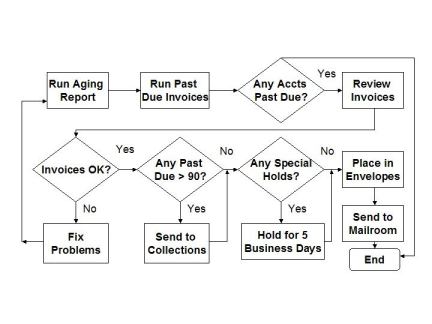
Figure 1 - Applying a Late Payment Penalty
If we identify some of the scenarios paths, we can see:
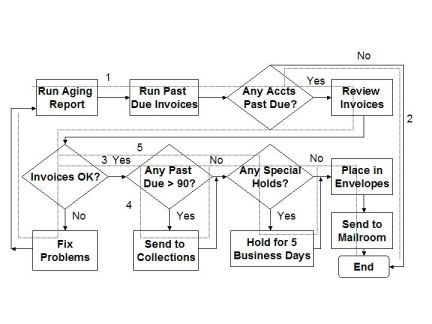
Figure 2 - Distinct Scenarios in Applying a Late Payment Penalty
Usage Patterns
Usage patterns are just ways that people naturally use a system or software. For example, some people are partial to using a mouse for as many actions as possible. Other people use the mouse and keystrokes. Some people make maximum use of shortcuts, while others ask, "What's a control key?"
The problem with this source of tests is that if you try to test all the software functions in all the usage patterns, you won't have time to finish the test. For this reason, I usually recommend this type of testing be done in usability testing.
Generic Test Sources
There are at least fourteen sources of tests:
1. Field and data edits - Are the field edits and attributes correct?
2. Record handling - Is information processed correctly from point to point in the application without data loss?
3. File processing - Are files accessed and processed correctly?
4. Field and data relationships - When two or more data items are related, are the relationships correctly processed?
5. Matching and merging of data - When two or more data sources are involved, are the data merged together correctly?
6. Security - Are the data protected from malicious access, both internal and external to the organization?
7. Performance - Does the application have sufficient performance to meet user needs in terms of response times, throughput, handling of load, etc.? This can also include stress testing to simulate the conditions that cause the application to fail due to excessive load.
8. Control flows (processes and code) - Do the various control flows in the code perform functions as intended?
9. Procedures and documentation - Do procedures and documentation accurately describe the application's behavior and function?
10. Audit trails - Can transactions and functions be traced to a specific time and user?
11. Recovery - Can processing be recovered from an error state?
12. Ease of Use - Can someone in the intended user audience use the application without extensive training or additional skills? Can the functions in the application be performed easily?
13. Error Handling - Are errors (both expected and unexpected) handled correctly?
14. Search - Can data be queried and found in the application?
Generic Functionality
This is functionality that is contained in most applications, such as adding, updating, deleting and querying data. The catch is that these functions are performed differently from one application to the next.
Exploratory Testing
In the absence of any pre-defined knowledge of system or software behavior, exploratory testing can be a way to both learn and to test. You may find behavior that is obviously incorrect and you may also observe behavior that leads to further research to determine correctness. Although I think exploratory testing is a helpful method, my main concern is how to know if I'm seeing a bug or a "feature." Be prepared to spend significant time in research or reporting defects that are not really issues.
What is Correct Behavior?
We have looked at ways to define the test, but how do we know if the observed results are correct? In a requirements-based approach, the answer would be to look at the requirements. However, we need to consider other sources for our oracle.
Here are a few sources of expected application behavior:
An Independent Processing Source - Let's say you are testing a computation in a new system that is replacing an older system. To check the result you could perform the same computation on the older system and compare the results. Or, you could create another source, such as a spreadsheet to have an independent source of comparison. Your approach would depend on what is available and what it would take to create something new.
Users - In some cases, you can ask a user to assess the correctness of your results. This could even be a part of acceptance testing or sign off. Of course, this depends on the knowledge, willingness and availability of users.
Other Subject Matter Experts - Your oracle may be a person who is not a user, but understands the processing rules enough to evaluate the results.
System Documentation - The quality (accuracy, detail and clarity) of the documentation is the key factor for its use in evaluating test results. This documentation can include user guides as well as technical design documents.
Training Materials - These may be detailed enough for test evaluation. At the very least, you should be able to verify that the documentation is accurate.
Before totally dismissing the above methods in favor of requirements, consider that even good requirements can have errors. So these methods can be another source of expected results even when requirements are defined.
Summary
For many years people have understood that in dealing with software and systems there may well be a difference between how a system is described on paper and how it is actually intended to behave. This difference is addressed in two views of test and evaluation: verification and validation.
Verification is based on project deliverables and evaluates something to determine if it has been built correctly according to specifications or the "paper world." This is primarily the developer perspective. Validation is based on evaluating something based on user need or simulated real world conditions. The intent is to determine fitness for use from the customer or user perspective. Without both perspectives, you are at risk of building or acquiring something that meets specifications, but is unfit for use.
Requirements-based testing is verification. It is a solid and valuable technique if you have clear testable requirements. The techniques discussed in this article are ways to test from the real-world usage perspective and can be considered validation.
Unfortunately, testers have been trained for so many years that the only way to test is based on requirements that many have forgotten or never learned other methods of testing. I something refer to this situation as "The Lost Art of Validation."
Remember that there are several phases and many types of testing. Requirements can define what should be tested and what defines correct behavior for some of these test phases and types, but not all of them. Requirements are best applied at the system phase of testing. The danger of basing user acceptance testing on requirements is that they may not accurately or completely define what is needed or desired.
Hopefully, this article has helped expand or reinforce your views of validation. In addition, I hope it gives you some new techniques to use in your test design and evaluation.
As I have led and trained test teams over the years, there are some things that I routinely make sure I convey to new testers. Whether you are new to testing, or a seasoned professional, these are helpful things to remember.
1. You are an inspector - You can't guarantee quality.
Many testers get sidetracked by not understanding that they assess things, not control them. There is a huge difference between the two! For example, a team may work weeks on a test and find many defects, only to see management decide to release the product with known serious defects. The team often feels demoralized and asks why they even do testing.
I ask the team members if they got paid, and most of the time the answer is "yes." I ask if they did their jobs to the best of their ability, and once again, most of the time they answer "yes." I then tell them, "You did your job. You tested to the best of your ability, found defects and reported them. Now, go home and relax. In fact, the only way you can fail as a tester is to fail to report a discovered defect or to fail to perform a specified test."
This may not improve morale much, but it does help keep things in perspective, especially in having the ability to not take the daily frustrations of work home every night.
Many testers, me included, when we first start out in testing, seem to feel personally responsible for the quality of the application or system we are testing. While the work ethic is admirable, we testers really have little control of the product quality. It is for this reason that testers do not ensure quality. The problem is that management doesn't always see that distinction. This is seen when management asks questions like, "Aren't we paying these people to have good software?"
2. Defects are valuable.
Each defect is an opportunity to learn and improve. We may only get one opportunity to observe a defect, so I always tell testers to be observant and not fall prey to the boredom of testing.
Defect information is perhaps one of the most telling sources of project data available. However, that depends on how well we capture and convey accurate information about the defects we find.
Each defect costs the organization money. If we don't learn from them, we are wasting a lot of time and money. The leverage happens when we convert a mistake to a learning opportunity. Let's face it-some lessons are only learned by experience.
It doesn't do any good to place blame over a defect. All blame does is lower morale and shut down communication. It's like beating the proverbial dead horse, hoping it will come back to life!
I wrote an article called "Defects are Good" which explores in more depth about the positive side of defects.
3. Everything is fine until you report the first problem.
This is where the reality of being a tester sinks in. You can plan the test, get all of the needed resources in place and it seems everyone is on your side. However, things tend to get tenser when you report that first problem.
The reason for the sudden change in attitude is that now you are criticizing someone's work. There is a pride of ownership that causes egos to be bruised and relationships to be strained. Some of this is to be expected, just be aware that attitudes may change when you start finding problems.
One thing I always suggest to testers is to read some of your past defect reports as if you were the recipient. You may find that you need to be more diplomatic. (See how gently I said that?) It may not be as much fun to write a defect report without sarcasm, but it will help maintain good relationships.
4. You can only test what you can observe.
You may want to test that really creative case, but if you don't have a way to observe the results, what's the point? Although some applications allow you to observe a lot, there are still things you may not have access to, such as structural views, hidden objects, background processing, etc.
5. Never forget how you get someplace.
I'm not speaking about knowing why you walked into a room, but of the steps you took in testing something. It's common for beginning testers to find a significant defect, only to fail to recreate it for resolution. Then, you're left with the uncomfortable feeling of not knowing if you truly found a defect, or just used the application incorrectly.
Some ways you can trace your steps include test scripts, a test log, and screen video capture tools such as Jing (https://www.techsmith.com/jing-tool.html)
6. Standards and processes are your friend.
Although the idea of standards and processes may seem confining to some, they give you valuable guidance in doing your job. Don't reject standards because they may be detailed and lengthy. Instead, use them as a guide to do your job faster and more consistently.
7. There's never enough time for testing.
Almost every tester complains there is not enough time for testing, but the reality is there is never enough time to test anything to a degree of completeness. This is especially true when you consider software attributes, such as usability, security, compatibility, interoperability, etc.
Instead of complaining about the lack of time, learn to prioritize based on risk and focus on the application objectives important to senior management. Sometimes we test more than we need to because our objectives are out of line with what the sponsors value.
8. You can't find all of the defects.
Don't get discouraged if a defect is found later in something you tested. You may do a very complete job and achieve a high level of defect removal, but 100% is an elusive goal.
9. Maintain a sense of humor and perspective
Being able to laugh and keep a healthy sense of balance may be your best survival mechanism. If you are in a bad situation, remember, this too will pass.
10. Strive for excellence instead of perfection
New testers often get caught up in the quest for perfection with the attitude that 100% correctness is the standard. I was a victim of this as well, but in my defense, I was influenced heavily by the TQM posters of the late 80's and articles such as "99.9% Isn't Good Enough."
The problem with perfectionism is that it will make your progress slower, introduce fear into everything you do, cause you to become more critical of others, and generally, drive even your friends and family to the point of despair.
Of course, no one wants mistakes, but they happen regardless. To think otherwise is to deny reality. Excellence is a habit that is shown in your attitude and dedication to the work you do. If you are committed to be the best, you will go the extra mile.
My observation is that most people are forgiving when they see a mistake or experience a lapse in service. The thing people pay the most attention to is your response to the problem.
11. Developers are not the enemy
It takes the entire project team to deliver a quality project. While it may seem at times that the developers don't care about quality, there may be more issues than meet the eye. You will make more progress by working with developers instead of against them. Remember that good communication is a major key to successful projects (and testing). When you take an adversarial position, the communication stops and so does much of your information needed for testing.
12. Build and maintain a personal network
Your personal and professional relationships are a great asset. They are a support system that can help when you have a job and when you don't. Find a mentor and when you learn enough lessons, become a mentor to someone else.
13. Keep building your skills
Your skills are what distinguish you from others. Always keep learning by attending professional meetings, obtaining certifications, and reading in the profession. I make it a goal to read at least one book a week on topics related to by personal and professional growth (testing, leadership, business, IT, etc.).
One personal development guru noted that if you read 30 minutes a day on any given topic, in five years you'll be an expert on the topic. It worked for me-try it for yourself!
14. When the going gets tough, the lazy get creative
I made a sign with this saying on it and hung it on my desk when I first became a test team leader. It reminded me to let creativity be my point of leverage in problem solving.
Learn to see problems in a new and creative way. You may have a good test plan, but how will you deal with changes? Flexibility is a key attribute of good problem-solving leaders.
15. Simple is not always easy.
Much of what we do in testing seems simple. However, the challenge is in the consistency required to maintain the effort.
Some solutions to problems may seem too simple at first, but don't discard an idea just because is it simple and obvious. Also, don't underestimate the effort needed to implement a simple idea!
Some readers of the book I co-wrote with William E. Perry, Surviving the Top Ten Challenges of Software Testing, have commented that the challenges are simple and easy to solve. That makes me wonder why people still raise the same "people problems" year after year. I think it is easier to obtain the head knowledge than to actually implement the solutions at work.
Conclusion
Before knowledge, comes wisdom. You may learn a lot of testing techniques, but your ability to apply them will be limited if you don't have the wisdom to know when to apply them and the context to understand them. One of the problems you have in starting out in just about anything is that "you don't know what you don't know." Wisdom helps you understand what you need to know to be successful.
The things I have listed are things I wish I had fully realized when I first started testing. I hope they serve you well.
As always, I would like to hear your comments about things you would have liked to known as a rookie tester. Just e-mail me from the contact page.
 Perhaps you get this question from family and friends. I know I do! Or, perhaps you have stumbled upon this site and are wondering what this site is all about.
It's always interesting to me that even in our own profession, craft, diversion, whatever you want to call it, we software testers discuss and debate the question, "What is Software Testing?"
When people ask me what I do, I often say, "I help people find problems in their systems before their customers have to experience them. That saves everyone time and money."
Other definitions could be:
- The act of breaking software to make it better,
- Proving the software works,
- Proving the software meets requirements,
- Proving the software meeting user needs,
- Determining compliance to a standard, and so on.
Here are some definitions from standard sources:
"The process consisting of all life cycle activities, both static and dynamic, concerned with planning, preparation and evaluation of software products and related work products to determine that they satisfy specified requirements, to demonstrate that they are fit for purpose and to detect defects." (ISTQB)
"The process of operating a system or component under specified conditions, observing or recording the results, and making an evaluation of some aspect of the system or component." (IEEE Std 610-1990)
"The process of analyzing a software item to detect the differences between existing and required conditions (that is, bugs) and to evaluate the features of the software items." (IEEE Std 829-1998)
These are all fine, and they are all focused on defects and the evaluation of a software product. The ISTQB definition even expands of the idea of software testing to include everything that happens prior to the test (such as test planning and design) and the things that happen after a test, such as test report and test environment restoration.
My value-added definition of software testing, which I often use, is:
"The process of providing meaningful information about software so that management can make informed decisions."
A final though here is that essentially, testing is measurement. We talk about "test metrics" and people say "I don't have time for metrics." However, measurements and metrics are the main deliverable we create! That's something to think about, but don't talk about it at the family reunion.
Rice Consulting's Public Course Schedule and Special Deals
Pre-recorded courses are available for all of the above courses, plus many others at https://mysoftwaretesting.com
Also, private in-house live virtual courses are available. Please contact us for details.
Can’t Travel? Don’t Want to Travel?
Check out our new virtual training schedule.
Whether your company has enacted travel restrictions for the Coronavirus concerns, or you have other reasons for not traveling, live virtual training offers a great option.
Your instructor will be Randall Rice, an expert trainer in software testing and ISTQB test certification.
For a class to form, we need at least 5 participants. If 4 or more people from the same company enroll, a 10% discount is offered.
Please check to see if your desired course includes the exam fee. If not, exam vouchers can be added at the time of purchase. RCS supplies and sells only ASTQB exams.
For people in the United States who register at least 1 week before the class start date, a physical book will be shipped for an extra $70.
In addition, all attendees will get a 30-day registration to the e-Learning version of the course for review.
ISTQB Foundation Level Course (2018 Syllabus Version) - April 27 - 28 (Thursday/Friday) – May 1 - 3, 2023 (Mon – Wed) Live Virtual, 8 a.m. to Noon, Pacific Daylight Time
Instructor: Randall W. Rice, CTAL (Full), CTFL-AT, CMT, Instructor of ISTQB Foundation for over 16 years.
This is a special 5 half-day formatted course to help prepare you for ISTQB Foundation Level certification. It's a great opportunity to get personal live training for the ISTQB CTFL certification. Exam included. Books are extra. To learn more and to register, please visit https://mysoftwaretesting.com/ISTQB-Foundation-Software-Testing--Live-Virtual-Course_p_46.html
Private in-house live virtual courses are available. Please contact us for details.
Also, please note that pre-recorded courses are available for all of the above courses, plus many others at https://mysoftwaretesting.com



This course is no longer available. To see the current course, the 2023 version, click here.
Register for e-Learning Here:

Register for Live Virtual training here.
Contact Us for an in-house course presentation.
3 days (4-day version recommended)
Based on the 2018 Foundation Level Syllabus! This is the most recent syllabus. Download the 2018 Foundation Level syllabus here.
Note: The 2018 changes are substantial. The 2011 exam and courses are available until May 30, 2019. Be sure that the materials you use are in sync with the desired syllabus version.
This course is available as in-house (live) training. The E-learning version is now available!
To schedule a presentation in your company, contact us for details.
"Just wanted to let you know I took the CTFL exam on Friday and got a 95%! Thanks for your online training course and for answering questions as they came up!"
M.H., Florida
This is a course designed for people seeking foundation level certification based on the ISTQB certification program. This course completely covers the most current ISTQB syllabus (2018 version) and also provides additional information and guidance in key areas. The terms used in this course are taken from the current ISTQB glossary. This course is offered in both live and e-learning formats.
This is suitable for people just getting into the field of software testing, seeking the ISTQB Foundation Level certification (CTFL) or for people who just need a refresher course or validation for their current testing techniques.
This is a practical course to cover the critical path of testing. Your instructor will be Randy Rice, a recognized authority in the QA and testing field. You will learn the terminology, process, and challenges of testing in the real world. As a result of attending this seminar, you should have a good working knowledge of software testing and what it takes to design and conduct an effective test of software, regardless of the technology.
This course will not only help you prepare for certification, but also help you become more comfortable and confident in testing software applications at just about any level of detail: unit, integration, system, and user acceptance. You will emerge from this course knowing how to develop test cases and test plans. You will also leave with the knowledge of how tools can help you perform testing.
Sometimes people feel intimidated by the technical aspects of software testing and lack the confidence they need to be credible test leaders in their organization. Learn the issues and processes for effectively testing software by attending this informative and comprehensive course.
Return on Investment
-
Prepare for the ISTQB foundation level certification exam (CTFL)
-
Understand the key issues in testing software applications.
-
Learn how to design tests that adequately cover requirements and business events.
-
Learn from an industry recognized expert in software testing and quality
-
Advance your career by reinforcing your testing expertise.
Who Will Benefit
-
Test managers and leaders
-
Testers
The program requires only basic IT knowledge or experience. Testing knowledge or experience is not a pre-requisite.
Topics
Module FNDA - Fundamentals of Testing (3 Hrs.)
- What Is Testing?
- Why Is Testing Necessary?
- Causes Of Software Defects
- Role Of Testing In Software Development, Maintenance And Operations
- Testing And Quality
- How Much Testing Is Enough?
- Errors, Defects and Failures
- Defects, Root Causes and Effects
- General Testing Principles
- Fundamental Test ProcessTest Process in Context
- Test Activities and Tasks
- Test Work Products
- Traceability
- The Psychology Of Testing
Module FNDB - Testing Throughout The Software Life Cycle (2.25 hrs.)
- Software Development Models
- V-Model
- Sequential, Iterative and Incremental Development Models
- Testing Within A Life Cycle Model
- Test Levels
- Component Testing
- Integration Testing
- System Testing
- Acceptance Testing
- Test Types: The Targets Of Testing
- Functional Testing
- Non-functional Testing
- White-box Testing (Structural Testing)
- Testing Related To Changes (Confirmation And Regression Testing)
- Maintenance Testing
Module FNDC - Static Techniques (2.25 hr.)
- Reviews And The Test Process
- Review Process
- Phases Of A Formal Review
- Roles And Responsibilities
- Types Of Reviews
- Success Factors For Reviews
FNDD - Test Design Techniques (5.5 hrs.)
- Identifying Test Conditions And Designing Test Cases
- Categories Of Test Design Techniques
- Specification-Based Or Black-Box Techniques
- Equivalence Partitioning
- Boundary Value Analysis
- Decision Table Testing
- State Transition Testing
- Use Case Testing
- Structure-Based Or White-Box Techniques
- Statement Testing And Coverage
- Decision Testing And Coverage
- Experience-Based Techniques
- Specification-Based Or Black-Box Techniques
Module FNDE - Test Management (3.75 hrs.)
- Test Organization
- Test Organization And Independence
- Tasks Of The Test Leader And Tester
- Test Planning And Estimation
- Purpose and Content of a Test Plan
- Test Strategy and Test Approach
- Entry and Exit Criteria
- Test Execution Schedule
- Factors Influencing the Test Effort
- Test Estimation Techniques
- Test Progress Monitoring And Control
- Metrics Used in Testing
- Purposes, Contents and Audiences for Test Reports
- Configuration Management
- Risk And Testing
- Definition of Risk
- Product and Project Risks
- Risk-based Testing and Product Quality
- Defect Management
Module FNDG - Tool Support For Testing (1 hr.)
- Test Tool Considerations
- Test Tool Classification
- Benefits and Risks of Test Automation
- Special Considerations for Test Execution and Test Management Tools
- Effective Use Of Tools
- Main Principles for Tool Selection
- Pilot Projects for Introducing a Tool into an Organization
- Success Factors for Tools
Review & Practice Exam (2 Hrs.)
Actual Certification Exam (If desired) (1 Hr.)
Resources
- Glossary
- Bibliography
Deliverables
- Course notebook with slides, worksheets, checklists, complete examples and supporting text
- You will have the basic information needed to sit for the ISTQB Foundation Level Certification exam.
Register for e-Learning Here:
Register for Live Virtual training here.
Contact Us for an in-house course presentation.
e-Learning: 20 hours
Live Virtual: 5 four-hour segments (includes breaks)
In-house classroom: 3 days (4-day version recommended)
Based on the 2023 Foundation Level Syllabus! This is the most recent syllabus. Download the 2023 Foundation Level syllabus here.
Note: The 2023 changes are substantial. The 2018 exam and courses are available until May 1, 2024. Be sure that the materials you use are in sync with the desired syllabus version.
This course is available as in-house (live) training. The E-learning version is now available!
To schedule a private presentation for your company, contact us for details.
"Just wanted to let you know I took the CTFL exam on Friday and got a 95%! Thanks for your online training course and for answering questions as they came up!"
M.H., Florida
This is a course designed for people seeking foundation level certification based on the ISTQB certification program. This course completely covers the most current ISTQB syllabus (2023 version 4.0) and also provides additional information and guidance in key areas. The terms used in this course are taken from the current ISTQB glossary. This course is offered in both live and e-learning formats.
This is suitable for people just getting into the field of software testing, seeking the ISTQB Foundation Level certification (CTFL) or for people who just need a refresher course or validation for their current testing techniques.
This is a practical course to cover the critical path of testing. Your instructor will be Randy Rice, a recognized authority in the QA and testing field. You will learn the terminology, process, and challenges of testing in the real world. As a result of attending this seminar, you should have a good working knowledge of software testing and what it takes to design and conduct an effective test of software, regardless of the technology.
This course will not only help you prepare for certification, but also help you become more comfortable and confident in testing software applications at just about any level of detail: unit, integration, system, and user acceptance. You will emerge from this course knowing how to develop test cases and test plans. You will also leave with the knowledge of how tools can help you perform testing.
Sometimes people feel intimidated by the technical aspects of software testing and lack the confidence they need to be credible test leaders in their organization. Learn the issues and processes for effectively testing software by attending this informative and comprehensive course.
Return on Investment
-
Prepare for the ISTQB foundation level certification exam (CTFL)
-
Understand the key issues in testing software applications.
-
Learn how to design tests that adequately cover requirements and business events.
-
Learn from an industry recognized expert in software testing and quality
-
Advance your career by reinforcing your testing expertise.
Who Will Benefit
-
Test managers and leaders
-
Testers
The program requires only basic IT knowledge or experience. Testing knowledge or experience is not a pre-requisite.
Topics
Module FNDA - Fundamentals of Testing – 180 minutes
- What is Testing?
- Test Objectives
- Testing and Debugging
- Why is Testing Necessary?
- Testing’s Contributions to Success
- Testing and Quality Assurance (QA)
- Errors, Defects, Failures, and Root Causes
- Testing Principles
- Test Activities, Testware and Test Roles
- Test Activities and Tasks
- Test Process in Context
- Testware
- Traceability between the Test Basis and Testware
- Roles in Testing
- Essential Skills and Good Practices in Testing
- Generic Skills Required for Testing
- Whole Team Approach
- Independence of Testing
Module FNDB - Testing Throughout the Software Development Lifecycle – 130 minutes
- Testing in the Context of a Software Development Lifecycle
- Impact of the Software Development Lifecycle on Testing
- Software Development Lifecycle and Good Testing Practices
- Testing as a Driver for Software Development
- DevOps and Testing
- Shift-Left Approach
- Retrospectives and Process Improvement
- Test Levels and Test Types
- Test Levels
- Test Types
- Confirmation Testing and Regression Testing
- Maintenance Testing
Module FNDC - Static Testing – 80 minutes
- Static Testing Basics
- Work Products Examinable by Static Testing
- Value of Static Testing
- Differences between Static Testing and Dynamic Testing
- Feedback and Review Process
- Benefits of Early and Frequent Stakeholder Feedback
- Review Process Activities
- Roles and Responsibilities in Reviews
- Review Types
- Success Factors for Reviews
Module FNDD - Test Analysis and Design – 390 minutes
- Test Case Overview
- Test Techniques Overview
- Black-Box Test Techniques
- Equivalence Partitioning
- Boundary Value Analysis
- Decision Table Testing
- State Transition Testing
- White-Box Test Techniques
- Statement Testing and Statement Coverage
- Branch Testing and Branch Coverage
- The Value of White-box Testing
- Experience-based Test Techniques
- Error Guessing
- Exploratory Testing
- Checklist-Based Testing
- Collaboration-based Test Approaches
- Collaborative User Story Writing
- Acceptance Criteria
- Acceptance Test-driven Development (ATDD)
Module FNDE - Managing the Test Activities – 335 minutes
- Test Planning
- Purpose and Content of a Test Plan
- Tester's Contribution to Iteration and Release Planning
- Entry Criteria and Exit Criteria
- Estimation Techniques
- Test Case Prioritization
- Test Pyramid
- Testing Quadrants
- Risk Management
- Risk Definition and Risk Attributes
- Project Risks and Product Risks
- Product Risk Analysis
- Product Risk Control
- Test Monitoring, Test Control and Test Completion
- Metrics used in Testing
- Purpose, Content and Audience for Test Reports
- Communicating the Status of Testing
- Configuration Management
- Defect Management
Module FNDF - Test Tools – 20 minutes
- Tool Support for Testing
- Benefits and Risks of Test Automation
Buy The Book!
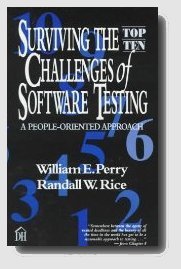
Randy's book, Surviving the Top Ten Challenges of Software Testing, will help you solve some of your toughest testing problems: people problems!
Now in Kindle format!
Click on the image to buy it from Amazon.com.